Notion Review 2026: Great Free Plan, Pricey Add-Ons
Notion review 2026: what the free plan includes, what Plus and Business cost, the AI add-on price, honest downsides from long-term testers, who should use it.
By Simple Life Reviews · Updated
This review was researched and drafted with AI assistance from publicly available tests and owner reports, then run through automated fact and source checks and an editorial pass. We did not test the product hands-on. How we review
Some links in this review are affiliate links. If you buy through them we may earn a commission, at no extra cost to you.
Our rating
Unmatched free plan, databases and templates for individuals and small teams; complexity, weak offline mode and a paid AI add-on hold it to four.
Ratings by product
- Notion
Notion is the app people recommend when you ask how to organise your notes, tasks, projects and team documents in one place, and in 2026 it has grown from a cult favourite among software teams into a platform pitched at enterprises and AI agents. Most Notion reviews are written by fans after a fortnight; this one pulls together the long-term testers at The Business Dive (three years in), Tech Stack Daily (since 2019), PCMag, Forbes Advisor, The Digital Project Manager and Freaking Nomads, the pricing pages they checked, and what frustrated users keep repeating, to answer whether the free plan is enough, whether Plus is worth paying for, and when a dedicated tool is the better buy.
Verdict in short: Notion is the best free all-in-one workspace for individuals and teams under roughly fifty people who want notes, databases, wikis and light project tracking in one tool. Pay for Plus when you hit the file-upload or guest limits, and skip Notion if you need offline access, best-in-class task management or a tool your non-technical colleagues will learn in an afternoon.
What Notion is
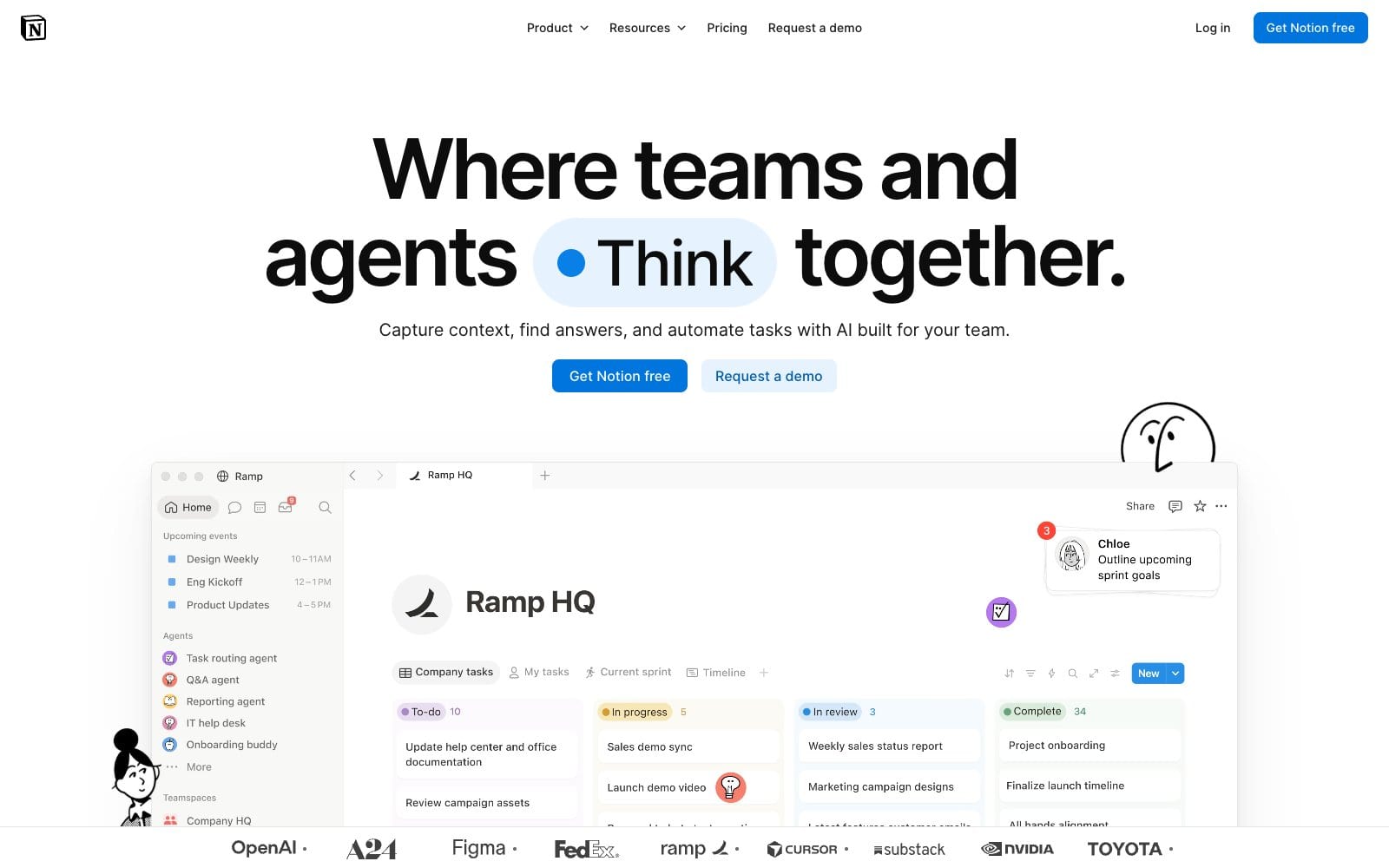
Notion is a block-based workspace: every paragraph, checklist, image, embed or database is a block you can drag, nest and rearrange, and pages can be linked and nested without limit. Tech Stack Daily traces the company from its 2016 launch through the remote-work boom to a $10 billion valuation in 2021, and describes today's pitch as one tool to replace your notes app, wiki, project manager, CRM and docs platform. The brand's own site now leads with AI agents and enterprise logos, claiming 100M users in over 50 countries and 62% of the Fortune 100 as customers.
PCMag frames it differently, as a note-taking app that is widely used inside the software industry and little known outside it, and that framing explains the split in the reviews: people who want a flexible system love it, and people who want a simple notebook or a real project manager bounce off.
Pricing
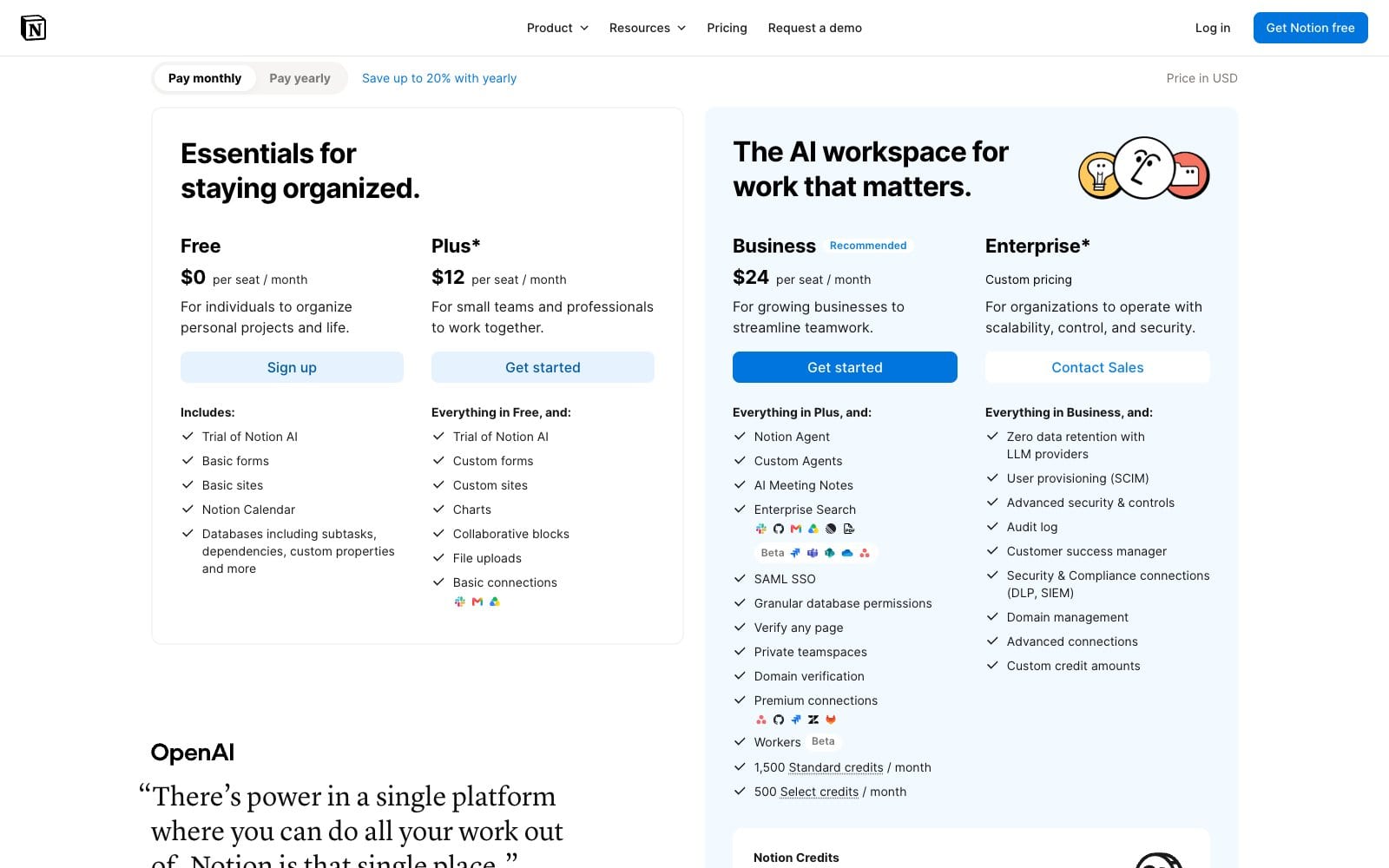
Notion sells four tiers, and the prices rose in 2026. The vendor pricing page, checked 2026-10-31, lists Plus at $12 per seat per month and Business at $24 per seat per month on monthly billing, with a discount for paying yearly and Enterprise on custom pricing. The reviews quote the older ladder: PCMag had Plus at what was $10 per person per month or $96 per year and Business at what was $18 or $180 per year, and Forbes Advisor quoted annual rates that were $8 and $15 a month. Treat those as history; budget on the vendor's current figures.
| Plan | Price per month | Limits | Free tier |
|---|---|---|---|
| Notion Free | Free for individuals | Unlimited pages and blocks, basic collaboration, small file uploads, a handful of guests, one week of page history | Yes, no time limit |
| Notion Plus | vendor pricing page: $12 per seat a month (checked 2026-10-31); lifts the upload cap, longer page history, more guests | Meant for individuals and small teams | Free plan below it; trial of Notion AI included |
| Notion Business | vendor pricing page: $24 per seat a month (checked 2026-10-31); SAML SSO, private teamspaces, AI meeting notes and agents | Team workspaces with admin controls | Forbes notes a team trial with a block limit |
| Notion Enterprise | Custom pricing | Unlimited page history, user provisioning, advanced security, audit log | Contact sales |
The free plan is the reason Notion spreads. PCMag describes its limits as 5MB file uploads, 10 guests and seven days of page history, with almost every feature available, and Tech Stack Daily calls it genuinely usable rather than a crippled freemium tier, enough for freelancers and solopreneurs to run a whole personal system for under $10 a month if they ever upgrade. Cancelling is a matter of downgrading in workspace settings; your pages stay, and anything over the free limits becomes read-only until you trim it.
The AI add-on
Notion AI is the sore point in every 2026 review. When the reviewers tested it, it was not bundled with any plan: PCMag put the add-on at what was $10 per person per month or $96 per person per year, doubling the cost of Plus at the time, and notes that Evernote and Microsoft Copilot do not charge extra for their AI. Tech Stack Daily frames it as $8–10 per user per month that stings when stacked on a Business plan for a team of 10–15, and says the workspace Q&A feature, which answers questions from your own pages with citations, is the one part that justifies the price for teams with large wikis; the writing features are commoditised. Its advice is the right one: build your real workflow on the free plan for a month, then decide about Plus, and only then test AI.
Features: what you actually get
Blocks and databases. The database system is still the star. Every table can be viewed as a board, calendar, gallery, list or timeline, filtered and related to other databases, and Tech Stack Daily calls it best-in-class for non-developers. The Business Dive's reviewer scores the project and task side four stars out of five: flexible enough for most teams, but slower to set up than a dedicated project manager and short on advanced reporting and automation.
Templates. You rarely start from a blank page. The Business Dive counts more than 40,000 templates, with most of the advanced paid ones priced between $2 and $10, while Freaking Nomads uses the library more than any other feature for content planning, budgeting and trip tracking.
Collaboration and permissions. Real-time editing, comments, task assignment and page, database and workspace-level permissions are in every plan, and Tech Stack Daily finds the system handles teams under 50 people well before it starts to feel patchwork at enterprise scale. Freaking Nomads notes the free plan allows up to 10 people in a workspace, which covers most freelance crews.
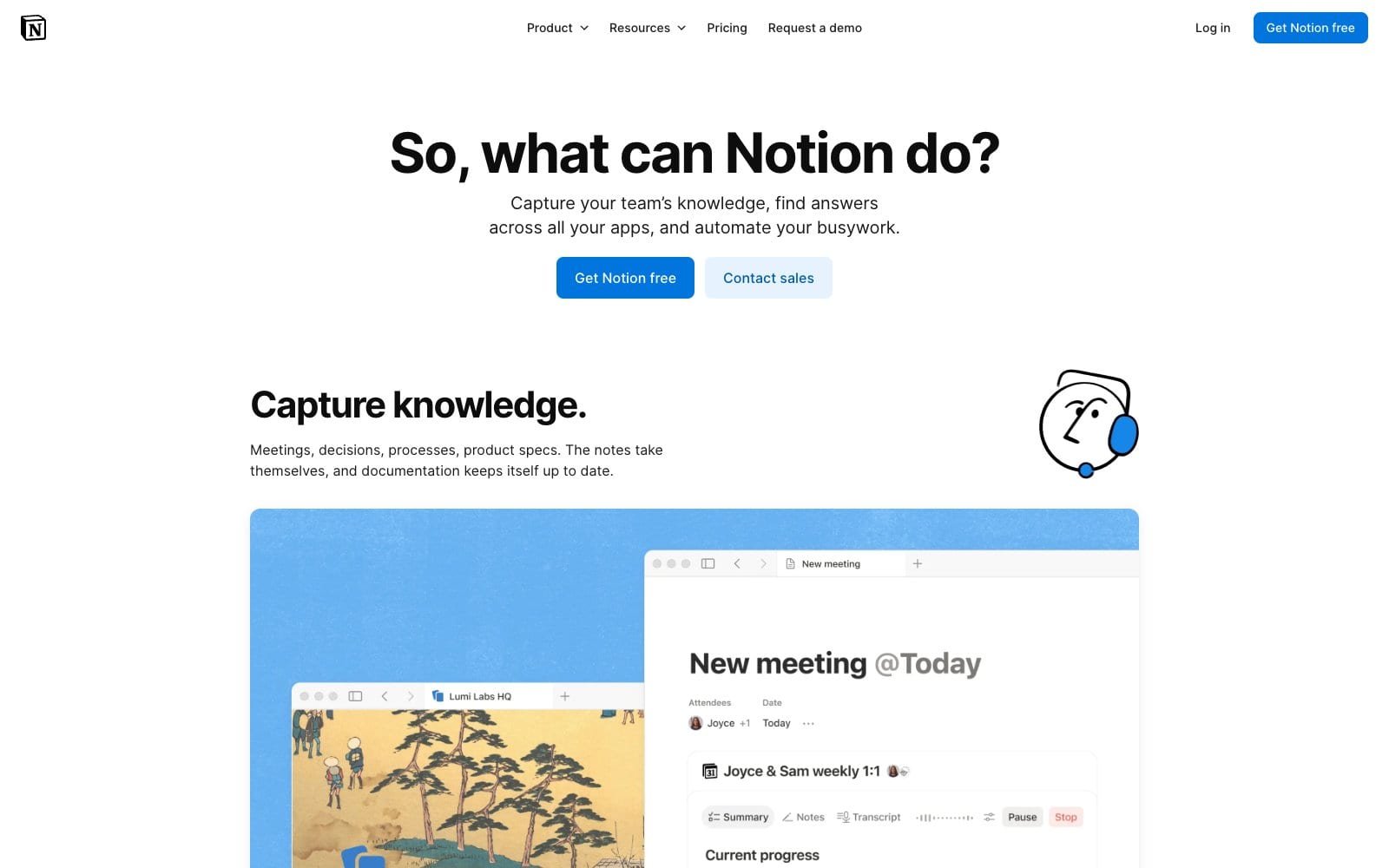
AI, agents and meeting notes. Beyond the writing assistant, Notion now offers Q&A over your workspace, AI meeting notes and custom agents that run tasks; The Business Dive rates them useful but shallow in places, and the brand's home page makes agents the headline.
Calendar and integrations. Notion Calendar, absorbed from the Cron acquisition, ties dated database entries to your calendar and, in Tech Stack Daily's view, meaningfully improved day-to-day use. The Business Dive counts 100+ direct integrations including Asana, ClickUp, Dropbox, Google Drive and Jira, and more than 8000 apps through Zapier; Forbes adds synced databases with Jira and GitHub and API access on every plan.
Importing. PCMag praises the import tools for Evernote, Google Docs, Quip and Asana and a universal ZIP import for Markdown and CSV, though a large folder took around 20 minutes; exporting is weaker, which matters if you ever leave.
Pros and cons
Pros
- Free plan with unlimited pages and blocks
- Databases with board, calendar, gallery and timeline views
- Tens of thousands of templates
- Real-time collaboration and granular permissions
- Imports from Evernote, Google Docs and Markdown
Cons
- Steep learning curve for non-technical users
- No reliable offline mode
- AI sold as a separate add-on
- Slows down with very large databases
- No page-level passwords
The downsides, honestly
Every long-term reviewer lists the same problems, and PCMag's verdict is the sharpest.
- It is complex. PCMag rates it 3.0, average, and says most people cannot go from simple notes to databases in an afternoon; Tech Stack Daily has watched non-technical teammates stare at a blank page because it does not behave like Word.
- Offline is weak or absent. PCMag lists no offline access as a con, The Business Dive calls it limited, and nobody disputes it.
- It slows down at scale. Large databases lag, and The Business Dive finds connecting and searching 1,000+ pages cumbersome next to Obsidian or Anytype, which is why its author no longer uses Notion as a permanent knowledge base.
- No password protection on individual pages, per The Business Dive.
- Master of none. The recurring verdict is that Notion does almost everything and nothing best: dedicated note apps, project managers and wikis each beat it in their lane.
- The mobile app lags the desktop, per The Digital Project Manager, and PCMag calls the web clipper mediocre.
- The AI tax described above.
The one Reddit voice in our sources sums up the hesitation: a user who has wanted to get into Notion since 2018 still finds it overwhelming and asks whether learning it is worth the time. The honest answer from the testers is yes if you commit to a simple setup first.
Security & data
Notion is cloud-only, so your data lives on its servers; the compliance questions people search for (SOC 2, GDPR, HIPAA) are addressed in The Digital Project Manager's FAQ, and the short version from the sources is that Notion publishes its compliance posture, that single sign-on arrives with the Business plan and user provisioning, advanced security controls and an audit log with Enterprise, per PCMag. Page history is the practical safety net: seven days on Free, 30 on Plus, 90 on Business and unlimited on Enterprise. What Notion lacks is a page-level password, so sensitive material should sit in a restricted teamspace rather than behind a share link, and the weak export story means you should schedule your own backups.
Should you pay for Plus?
Upgrade when you hit a wall, not before. The triggers reviewers name are file uploads larger than the free cap, more than a handful of outside guests, and needing page history beyond a week to recover mistakes. If none of those bite, the free plan is the right plan; if you run a team, Business is where admin controls and SSO live. The vendor page now bundles a trial of Notion AI into every tier, so test the Q&A feature there before paying for more.
Who it's for
Use Notion if you are a freelancer or solopreneur building a personal operating system, a creative or marketing team under fifty who needs shared docs, project boards and a wiki without Confluence's weight, or a student organising courses; the free plan covers all three, and Plus is cheap insurance once you need bigger uploads or more guests.
Look elsewhere if you need offline access on planes and trains, you run sprint-heavy engineering or large task portfolios, your databases will grow into the tens of thousands of rows, or your team will not sit through onboarding. Obsidian, OneNote, ClickUp and Confluence each do one of those jobs better.
Alternatives
| Alternative | Monthly price | Where it beats Notion | Where Notion wins |
|---|---|---|---|
| Microsoft OneNote | Free, with PCMag noting a 5GB storage limit tied to OneDrive | Free, offline, simple notebooks, Office integration | Databases, templates, collaboration structure |
| Obsidian | PCMag: $50 a year for sync | Local files, offline, linked notes at scale | Team collaboration, databases, templates |
| Evernote | PCMag: $14.99 a month personal | Web clipper, OCR, bundled AI | Price, flexibility, free plan |
| ClickUp | Not priced in our sources | Deeper task management, reporting, automation | Docs and wikis, simplicity for small teams |
PCMag's Editors' Choice picks for note-taking are OneNote and Joplin, with Obsidian recommended for power users; The Digital Project Manager points project-first teams at ClickUp and Jira. If your real need is one tool for a small business, our Canva review covers the design side and our Shopify review the storefront, and both pair well with a Notion workspace as the hub.
Our ratings
Overall: 4/5. Overall, Notion earns four because The Business Dive scores it 4.3 after 1,000+ hours and Tech Stack Daily and The Digital Project Manager land near the same mark for flexibility, the free plan and the database system, while PCMag's complexity and offline objections and the paid AI add-on keep it from higher.
Notion
Notion scores 4/5. The free plan and databases are unmatched in the category, confirmed by Tech Stack Daily's 4.1 after seven years of use, but the learning curve, missing offline mode and PCMag's 3.0 verdict for ordinary note-takers are real.
FAQ
Is Notion really free?
Yes. The free plan has no time limit and includes unlimited pages and blocks for individuals. PCMag lists the limits as 5MB per file upload, 10 guests and seven days of page history, and both it and Tech Stack Daily call the free tier usable for real work.
How much does Notion Plus cost?
The vendor pricing page lists Plus at $12 per seat per month and Business at $24 per seat per month as of 2026-10-31, with a saving for yearly billing. PCMag reviewed it when Plus was $10 and Business $18, so older articles will show those figures.
Does Notion work offline?
Not reliably. PCMag lists no offline access among its cons and The Business Dive calls offline access limited; the desktop and mobile apps need a connection for anything beyond recently opened pages. If offline matters, Obsidian or OneNote is the safer choice.
Can I use Notion on mobile?
Yes. PCMag notes apps for iPhone and iPad on iOS 15 and higher and for Android 8 and higher, alongside Mac, Windows and web apps. Reviewers find the mobile app less intuitive than the desktop version for building, though fine for reading and ticking tasks.
Is Notion secure and GDPR compliant?
Notion publishes its compliance posture and the Digital Project Manager's FAQ walks through SOC 2, GDPR and HIPAA questions; single sign-on comes with the Business plan and provisioning, advanced security and an audit log with Enterprise. There is no page-level password, so use teamspace permissions for sensitive material.
Is Notion worth it in 2026?
For most individuals and small teams, yes, on the free plan or Plus. The market has caught up, as Tech Stack Daily puts it, but nothing matches the combination of free tier, databases and templates. Pay for AI only after testing the Q&A feature on your own wiki.
What is better than Notion?
It depends on the job. PCMag prefers OneNote and Joplin for plain note-taking and Obsidian for power users; The Digital Project Manager points project-first teams at ClickUp or Jira; Confluence suits large enterprises. Notion wins when you want all of those jobs done adequately in one place.
Is Notion easy to use?
The basics are, the rest is not. Forbes Advisor praises the onboarding videos and slash-command blocks, but every tester warns of a steep learning curve once you build databases. Start from a template and keep your first setup small.