Bài đánh giá này được viết bằng Tiếng Anh.
Corsair Review 2026: Keyboards, Headsets and Gear Worth Buying?
Our Corsair review covers keyboards, the Xeneon Edge, Virtuoso Max headset, PC parts, iCUE software, prices and returns to help you decide what is worth buying.
Bởi Simple Life Reviews · Cập nhật
Bài này được nghiên cứu và soạn với sự hỗ trợ của AI từ các thử nghiệm và phản hồi người dùng công khai, sau đó qua kiểm tra tự động về số liệu, nguồn và một lượt biên tập. Chúng tôi không dùng thử sản phẩm trực tiếp. Cách chúng tôi đánh giá
Một số liên kết trong bài là liên kết affiliate. Nếu bạn mua qua đó, chúng tôi có thể nhận hoa hồng mà bạn không mất thêm chi phí.
Điểm của chúng tôi
Corsair's keyboards hold up in lab testing and its enthusiast products are well reviewed. High prices and finicky iCUE software keep it from a higher score.
Điểm theo sản phẩm
- Corsair Xeneon Edge
- Corsair Virtuoso Max Wireless
Corsair started out selling memory and grew into one of the biggest names in PC gaming gear: keyboards, mice, headsets, monitors, cases, power supplies and complete PCs. That breadth makes a single "Corsair review" tricky, because a great keyboard tells you little about a power supply. We read the strongest independent reviews of the lines people search for most, checked current prices on corsair.com, and pulled the picture together line by line.
Verdict: is Corsair a good brand?
Corsair is a safe pick for PC gamers and builders who want feature-rich gear that works together through one app. Its keyboards hold their own against Logitech and Razer in lab testing, and it makes unusual enthusiast products nobody else does. Expect premium prices, software that can be finicky, and a lineup confusing enough that you should check exactly which model you are buying.
Corsair's main lines and current prices
Corsair's catalog runs from small peripherals to workstation hardware. The table shows a cross-section, with prices taken from the brand's own product pages at the start of November 2026, plus a headset priced by a German review.
| Model | Price | Warranty | Trial |
|---|---|---|---|
| Corsair SABRE v3 PRO wireless gaming mouse | $179.99 (Corsair product page) | See Buying direct | See Buying direct |
| Corsair Xeneon Edge 14.5-inch touch screen | $249.99 (Corsair product page) | See Xeneon Edge section | See Buying direct |
| Corsair FRAME 5000D WORKSTATION case | $189.99 (Corsair product page) | See Buying direct | See Buying direct |
| Corsair WS3000 workstation power supply | $629.99 (Corsair product page) | See Buying direct | See Buying direct |
| Corsair AI WORKSTATION 300 desktop PC | $4599.99 (Corsair product page) | See Buying direct | See Buying direct |
| Corsair Virtuoso Max Wireless headset | 330 euros at launch, from 206 euros later (GameStar) | Not stated | Not stated |
The spread is the point: a mouse costs less than a nice dinner for four, while the AI desktop is priced like a used car. Most readers searching for a Corsair review want the gaming peripherals, so that is where we focus.
Keyboards: Corsair's strongest line
Keyboards are where Corsair has the most independent evidence. RTINGS has bought and lab-tested over 295 keyboards and keeps a running list of the best Corsair models, with recent reviews of the SKIFF 100 PLUS, VANGUARD 96, GALLEON 100 SD and VANGUARD PRO 96. Its picks run from the flagship Corsair K100 RGB down to the budget SKIFF 100 PLUS, which uses quiet rubber-dome switches and 10-zone lighting instead of per-key RGB.
The higher-end boards add the things enthusiasts pay for: dedicated macro keys, deep RGB control, 8000Hz polling and adjustable actuation on Hall effect switches, as RTINGS describes them. It sorts the current range into a few families:
- Vanguard: near full-size boards with macro keys on the left and a small LCD screen and knob on the right, in mechanical, optical or Hall effect versions.
- K65: compact boards in several sizes; RTINGS calls it one of Corsair's more confusing series because similar-looking models differ in small but meaningful ways.
- GALLEON: a single premium model with a built-in Stream Deck panel.
- SKIFF and K70: the value and mid-range picks, with the K70 CORE as the mechanical step up from the SKIFF in RTINGS's picks.
Against rivals, RTINGS compares Corsair directly with Logitech, Razer and SteelSeries; the takeaway for buyers is that Corsair competes on features and lighting, and that the right pick depends on the specific model rather than the brand.
Xeneon Edge: the quirky second screen
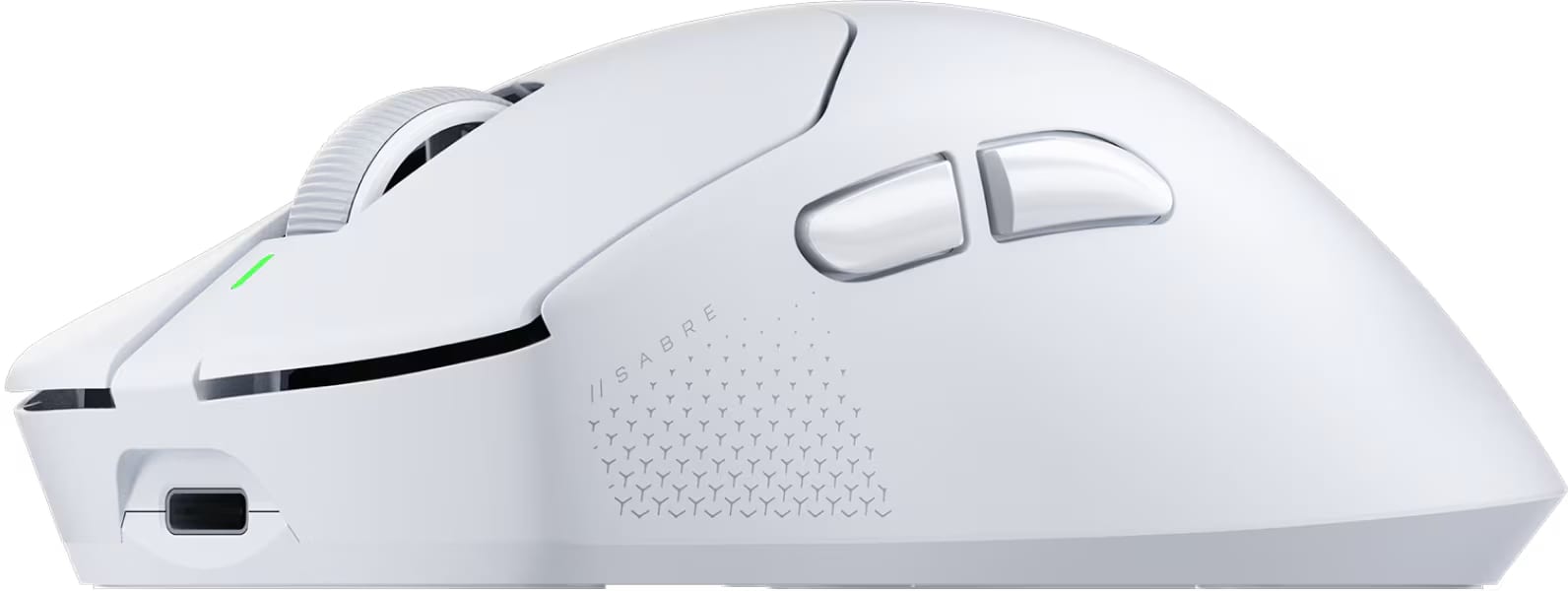
The Xeneon Edge shows Corsair's habit of building things for enthusiasts that no one else sells. PCMag rated it Excellent and describes a 14.5-inch IPS touch panel with a 2560 by 720 resolution, a 32:9 shape, a 60Hz refresh rate and a 2-year warranty, at an MSRP of $249.99.
What makes it useful is placement. It can sit under your main monitor as a strip of widgets, run vertically beside it, stick to anything metal with built-in magnets, or mount inside a glass-sided PC case as a system monitor. Through Corsair's iCUE software it can show temperatures, controls and shortcuts.
The snags PCMag found are worth knowing before you buy: first-time setup in iCUE was finicky, its test unit had a small screen blemish, and mounting it inside a case can mean routing an HDMI-to-DisplayPort cable through a gap or an open expansion slot. Inside a case you also lose touch input, since the screen sits behind glass.
Headsets: Virtuoso Max Wireless
For headsets, the most detailed source is a long-term review from German site GameStar, which calls the Virtuoso Max Wireless Corsair's best gaming headset after a year of use. Its spec sheet lists up to 60 hours of battery with lighting off, wireless range up to 15 meters on the 2.4 GHz link and 9 meters over Bluetooth, and 50 mm drivers.
The reviewer singles out the detachable microphone, which callers said sounded better than the reviewer's Razer headset, plus active noise cancellation and the ability to connect to two devices at once. The weak spots: some harshness at high volume and in the treble, and no SoundID sound tuning on consoles. Price was the big objection at launch, at 330 euros, but GameStar reports it later dropped to around 206 euros at its lowest, which makes it much easier to recommend. Corsair supplied the review unit, which GameStar discloses.
PC parts and workstations
Corsair is also a major PC-building brand, from cases and fans to power supplies and pre-built systems. On the workstation end, the FRAME 5000D WORKSTATION case sells for $189.99, the WS3000 power supply for $629.99, and the AI WORKSTATION 300 desktop for $4599.99, all on Corsair's own store. We did not find independent reviews of these models in our sources, so we cannot judge them; check lab reviews of the exact model before spending at that level.
iCUE software: the glue and the friction
Almost every Corsair product ties into iCUE, the desktop app for lighting, macros, device settings and screens like the Xeneon Edge. When it works, one app controls your keyboard, mouse, headset, fans and display together, which is a real advantage if you buy into the ecosystem. The downside shows up in reviews: PCMag's setup trouble with the Xeneon Edge is typical of the complaints. Corsair's homepage also offers a browser-based Web Hub for onboard profiles and a firmware update tool, so some devices can be set up without running iCUE all the time.
Buying direct from Corsair
Corsair's homepage lists 60-day risk-free returns, free next-business-day shipping (with an asterisk, so read the terms) and live chat with product specialists for orders placed directly. That return window is longer than many retailers offer, which helps when you are unsure whether a keyboard layout or headset fit will suit you. Warranty length varies by product; PCMag lists 2 years for the Xeneon Edge, so check the product page for anything else.
Pros and cons
Pros
- Wide range covering nearly every part of a gaming PC and desk setup
- Lab-tested keyboards that compete with Logitech and Razer
- Enthusiast products like the Xeneon Edge that few rivals match
- One app ties lighting and settings together across devices
- Long return window when you buy direct
Cons
- Premium pricing, especially at launch
- iCUE setup can be finicky
- Confusing lineups with similar-looking models
- Little independent coverage of some newer workstation products
Who should buy Corsair
Buy Corsair if you are building or upgrading a gaming PC, want gear that shares one lighting and control app, or like enthusiast extras such as macro keys, high polling rates and add-on screens.
Skip it if you want the simplest plug-and-play setup with no companion software, need the cheapest peripherals, or are buying workstation hardware without a lab review of that exact model.
Alternatives
The rivals that come up most in reviews are Logitech, Razer and SteelSeries. RTINGS compares Corsair's keyboards with all three, and GameStar points headset buyers who can live with a cable toward Beyerdynamic's gaming headsets. If you are kitting out a whole setup, our Bose review covers premium headphones for music and calls, our Anker review covers chargers and power, and our Baseus review covers cheaper power banks and earbuds.
Our ratings
Overall: 4/5, because Corsair's keyboards hold up in RTINGS lab testing and its niche products like the Xeneon Edge are well reviewed, while high prices and finicky software keep it from the top score.
Corsair Xeneon Edge
Corsair Xeneon Edge: 4.5/5. PCMag rated it Excellent for its flexible mounting, touch widgets and iCUE integration at $249.99, with setup quirks and a small blemish on its test unit as the only real marks against it.
Corsair Virtuoso Max Wireless
Corsair Virtuoso Max Wireless: 4/5. GameStar praises its microphone, 60-hour battery and dual connection, and its price has fallen from the 330-euro launch level, though treble harshness and missing console sound tuning hold it back.
FAQ
Is Corsair a good brand?
Yes, for gaming peripherals and PC parts. Its keyboards compete with Logitech and Razer in independent lab testing, and its niche products earn strong reviews, but prices are high and the software can be fiddly.
What is iCUE and do I need it?
iCUE is Corsair's desktop app for lighting, macros and device settings. You need it for full control of most products, though some devices can store onboard profiles and be configured through Corsair's browser-based Web Hub instead.
What is Corsair's return policy?
For purchases made directly from Corsair, its homepage lists 60-day risk-free returns. Retailers set their own return windows, so check before buying elsewhere.
What warranty does Corsair offer?
It depends on the product. PCMag lists 2 years for the Xeneon Edge; check the product page for the item you are buying.
Is Corsair better than Razer or Logitech?
Neither brand wins across the board. RTINGS compares Corsair keyboards head to head with Logitech, Razer and SteelSeries and picks winners model by model, so compare the specific products rather than the logos.
Is the Corsair Xeneon Edge worth it?
If you want a touch-screen strip for system stats, shortcuts or widgets, yes: reviewers find nothing else quite like it. If you just need a second monitor, a regular portable display will give you more screen for the money.