Cet avis est rédigé en Anglais.
WeCreat Vision Pro 45W Review 2026: Tests, Prices and Who Should Buy
WeCreat Vision Pro 45W review: what four independent testers found, current pack and add-on prices, software and safety caveats, warranty and return fees.
Par Simple Life Reviews · Mis à jour
Cet avis a été élaboré et rédigé avec l'aide de l'IA à partir de tests publics et de retours de propriétaires, puis soumis à des vérifications automatiques des faits et des sources et à une relecture éditoriale. Nous n'avons pas testé le produit nous-mêmes. Notre méthode
Certains liens de cet avis sont des liens d'affiliation. Si vous achetez via ces liens, nous pouvons percevoir une commission, sans frais supplémentaires pour vous. Comment nous gagnons de l'argent

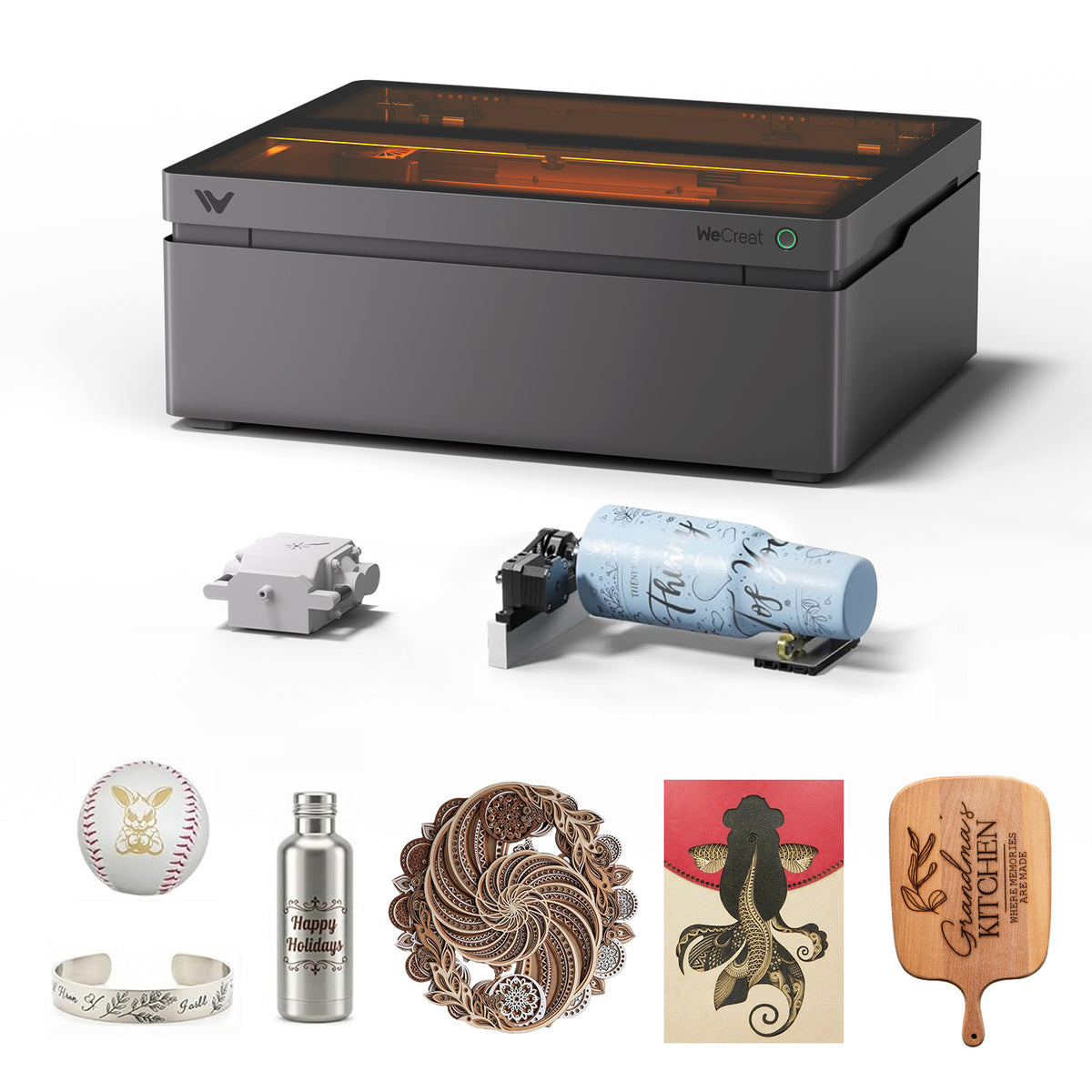
The WeCreat Vision Pro 45W is the enclosed diode laser that replaced the original Vision at the top of WeCreat's craft lineup. This WeCreat Vision Pro review pulls together what four independent testers found when they ran real jobs on it, then adds the parts those reviews date quickly on: today's pack prices, the add-ons you will probably end up buying, and the warranty and return terms.
Our verdict on the WeCreat Vision Pro 45W
Buy the Vision Pro if you run, or want to start, a small engraving business from a spare room or garage and need one enclosed machine for wood, slate, leather, tumblers and long signs. Both Tom's Hardware and TechRadar gave it an Editor's Choice award, and Tom's Hardware named it its best laser cutter for a home business.
Skip it if you only engrave a few gifts a year, because the cheaper WeCreat Vista or Vision will do that work, or if you need to cut clear acrylic or engrave metal all day. A diode laser cannot cut clear acrylic, and metal work on this machine depends on a 2W infrared module that costs extra. The other honest warning is cost creep: the machine is good on its own, but the rotary, fume extractor, conveyor and infrared module are what the reviewers were really praising, and each one adds to the bill.
Price and packs
WeCreat sells the Vision Pro in four packs on the WeCreat Vision Pro product page. When we checked in November 2026 a sale was running, and the store applied a further automatic discount at checkout for larger orders, so the table shows three figures per pack.
| Pack | List price | Sale price | Price after auto discount |
|---|---|---|---|
| Vision Pro 45W Basic Pack | $2,740 | $1,890 | $1,790 |
| Vision Pro 45W Rotary Pack | $2,940 | $2,090 | $1,990 |
| Vision Pro 45W Rotary + Conveyor Pack | $3,590 | $2,590 | $2,490 |
| Vision Pro 45W Super Pack | $4,640 | $3,390 | $3,090 |
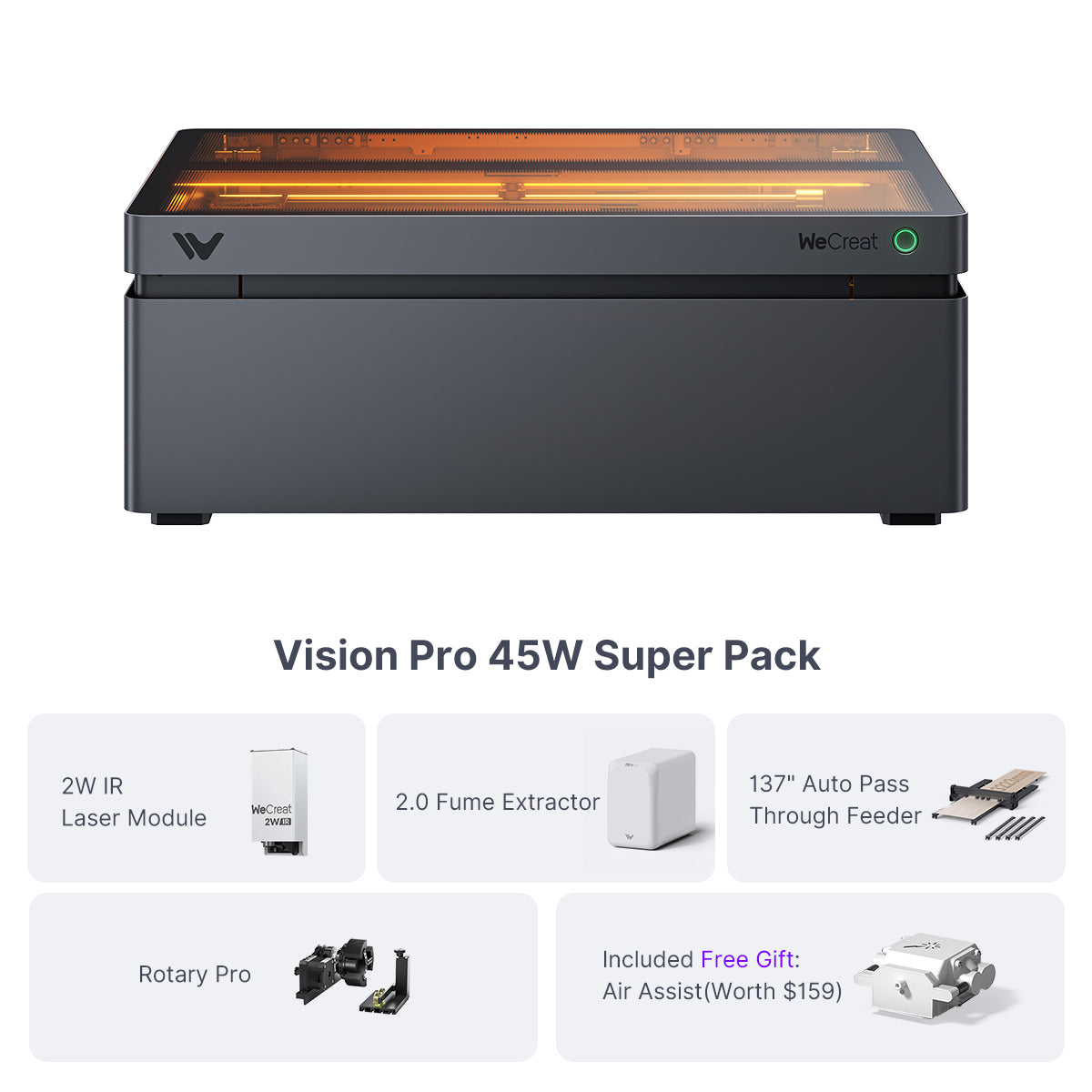
All four rows come from the WeCreat Vision Pro product page. Sale prices in this category move every few weeks, so check the live page before you order.
The same page prices the add-ons separately:
| Add-on | Price | What it is for |
|---|---|---|
| AirGuard Ultra 2.0 Fume Extractor | $1,099 | Filtering smoke and odor when you cannot vent outdoors |
| Auto Pass Through Feeder (137") | $699 | Feeding long boards through the machine for signs |
| 2W Infrared Laser Module for Vision Pro | $599 | Engraving bare metal and plastics |
| Honeycomb Panel for Vision Pro 45W | $109 | Cleaner cuts with less scorching underneath |
For context on how far prices have moved, TechRadar listed the standard machine at $2,899 in July 2025, and Tom's Hardware priced the Super Pack at $3,449.99 in May 2025. Treat both as history.
Which pack makes sense? If you sell tumblers, the Rotary Pack is the obvious start. If you will run the laser inside your home, budget for the fume extractor from day one; Tom's Hardware's reviewer said cutting in his garage would have been impossible without some form of air handling.
Specs at a glance
| Spec | WeCreat Vision Pro 45W |
|---|---|
| Laser | 45W diode, 455nm, Class 1 enclosure |
| Spot size | 0.08mm x 0.08mm |
| Work area | 19.7 x 12.6 inches (500 x 320mm) |
| Work area with pass-through feeder | 18.11 x 137 inches (brand claim) |
| Max object height | 140mm (5.51 inches) with auto-lift |
| Machine footprint | 26.8 x 20.87 x 9.96 inches |
| Connectivity | USB and Wi-Fi |
| Software | WeCreat MakeIt!, LightBurn compatible |
The laser, spot size, work area, height, footprint and connectivity figures are from the Tom's Hardware spec table; the pass-through figure and LightBurn compatibility are from the WeCreat product page.
The work area is about the size of an A3 sheet. That matters for sellers more than hobbyists: it is the difference between engraving a handful of coasters per run and filling a jig with dozens of small items.
What the independent tests found
Cutting and engraving
Andrew Sink of Tom's Hardware, writing in May 2025, engraved slate coasters, silicone watch bands, birch plywood and stainless steel. A plywood medal display from the built-in project library was cut out in 12 minutes and 48 seconds, and he changed nothing except the material type; focus and cut settings were set automatically.
Alastair Jennings of TechRadar, writing in July 2025, reported that the laser cut and engraved basswood quickly with clean, crisp edges that few other diode engravers he had used could match. He scored the machine 5 out of 5 for design and 4.5 out of 5 for value.
Rob Redman of Creative Bloq, writing in August 2025, made a point the others skipped. Because the laser head travels on a gantry and always points straight down, deep cuts stay square across the whole bed, which is not true of compact mirror-steered machines.
One hands-on depth figure comes from Lynn Lopez at The Gadgeteer: on a hardwood offcut at 100 percent power, a test array engraved to roughly a quarter inch deep, and the letters of her finished sign came out at a uniform depth.
WeCreat advertises "60W-like" cutting through 25mm basswood thanks to a beam concentrator it calls BeamFocus. None of the four reviews publishes a measured 25mm cut, so treat that number as a brand claim and plan on multiple passes for thick stock.
Auto-lift and camera
The feature every reviewer liked most is the one WeCreat carried over from the original Vision: the whole upper enclosure rises and lowers to focus, so there is no manual focusing and no riser base to buy. Tom's Hardware measured room for objects up to 140mm (5.51 inches) tall.
The camera is new on the Pro, and Creative Bloq's reviewer called it reason enough to choose this model over the old Vision, since you drag your design onto a live picture of the material instead of lining things up with pins.
It is not perfect out of the box. TechRadar found camera-to-laser alignment significantly off on arrival, which WeCreat says can happen in shipping. The fix was a short calibration using four wooden squares supplied with the machine, and alignment stayed accurate for the rest of the test. The Gadgeteer found dark materials hard to see on the bed.
Rotary, pass-through and infrared module
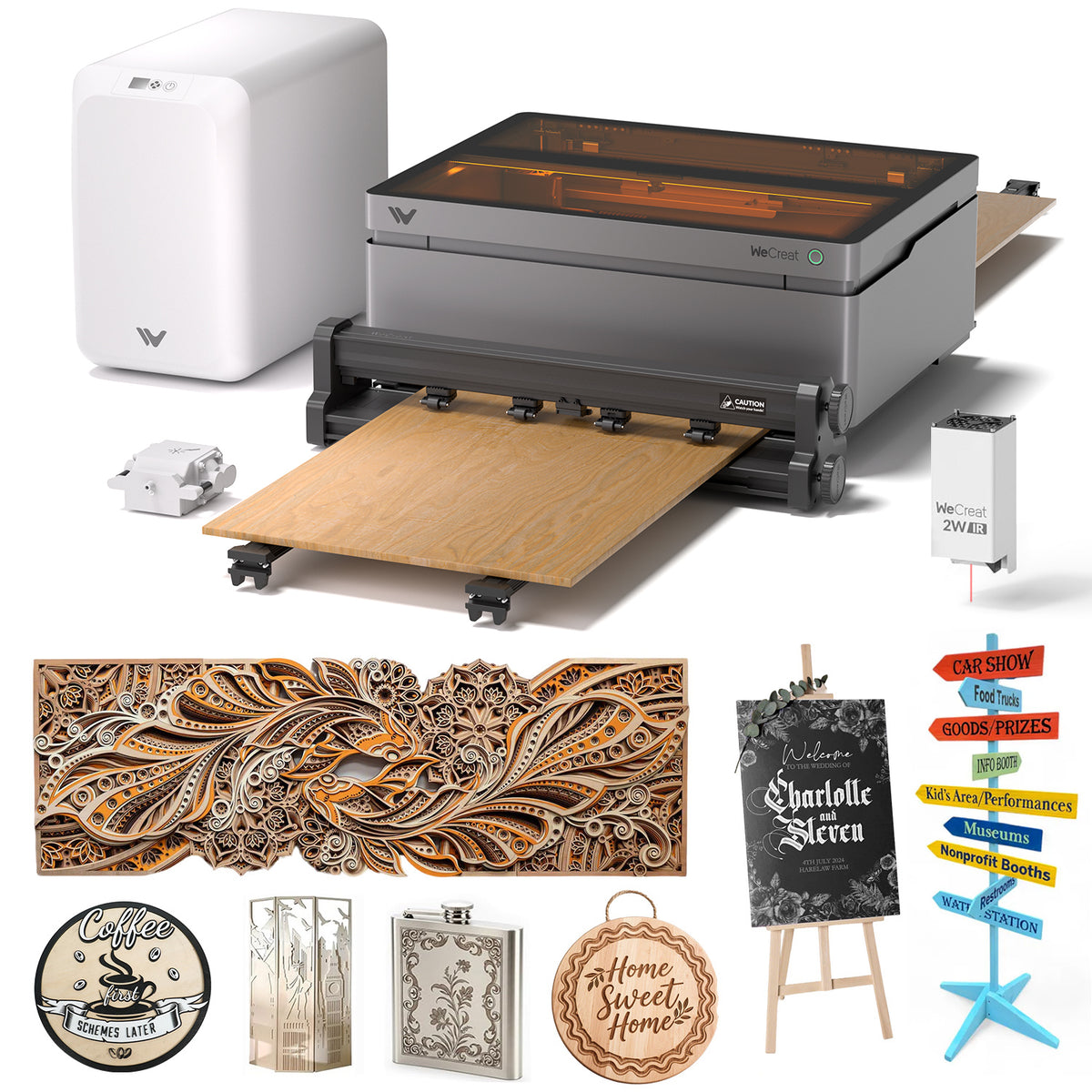
Tom's Hardware tested all three main accessories. The Rotary Pro engraved stainless steel tumblers without trouble, the pass-through feeder handled material up to 12 feet long, and the 2W infrared module engraved a stainless steel bottle opener with no surface preparation. Creative Bloq added that the rotary chuck grips items from the inside or the outside, and that the infrared module can produce different colors on metal with some testing.
TechRadar set the limit clearly: at 2W the infrared module is for marking metal, not cutting it. The Gadgeteer's reviewer liked the rotary on work cups but found its power cord too short to route the way the manual shows.
Smoke and smell
With the AirGuard Ultra attached, TechRadar reported almost no smell in the workshop, and The Gadgeteer's reviewer said she had no noxious fumes in her office. Without filtration the picture changes. One verified buyer review on WeCreat's product page says the built-in fan and hose alone did not get rid of the smell. Plan on either a window vent or the extractor.
Software: MakeIt! and LightBurn
MakeIt! is free and does two jobs: it is a project library and a layout tool. Reviewers agreed it is easy. Creative Bloq singled out the material preview, which shows how different settings will look on your chosen material before you burn anything, and found it accurate.
It is also where most of the complaints land. TechRadar saw the software disconnect when idle and take a while to reconnect. The Gadgeteer called it a little glitchy and gave up on Wi-Fi in favor of USB after it failed to reconnect following power cycles. Buyer reviews on WeCreat's own page mention occasional freezes and a feature set that feels basic for business use. If you already work in LightBurn, WeCreat lists the Vision Pro and its camera as compatible.
Safety at home
The Vision Pro is a Class 1 device with a fire-retardant metal enclosure and a light-filtering lid, according to Tom's Hardware. That makes it far safer around family than an open-frame laser, but two details from The Gadgeteer are worth knowing: there is no emergency stop button, only the front job button and a rear power switch, and a job cannot be started remotely, since someone has to press the front button. The second is a sensible safeguard; the first is a gap at this price.
Whatever the enclosure rating, do not leave a cut running unattended, and avoid materials that give off hazardous fumes, such as PVC.
Setup, size and weight
Setup is quick. TechRadar had the machine cabled and ready in about five minutes, and Tom's Hardware notes six shipping screws that must come out before the lift can move. The shipping box in Tom's Hardware's review measured 36 x 26 x 16 inches and weighed 78 lbs, and Creative Bloq's only listed drawback was the weight. You need a sturdy, deep bench, plus floor or shelf space for the fume extractor.
Warranty, shipping and returns
WeCreat's warranty policy covers the main machine, fume extractor, pass-through feeder and laser module for 1 year from receipt, and accessories for 30 days. Keep the original packaging; the policy asks for it during the warranty period.
The shipping policy offers free shipping to the continental US and most of Canada, with an average transit time of 3-7 business days. Alaska, Hawaii and US territories are excluded.
Returns are allowed within 30 days under the refund policy, but they are not free for a change-of-mind return: the fee is 7% for an unopened machine, 12% if opened and unused, and 15% if opened and used, and you pay return shipping unless the problem is a defect. On a machine at this price, that is a real cost, so decide on the pack carefully.
Pros and cons
Pros:
- Editor's Choice awards from both Tom's Hardware and TechRadar
- Auto-lift focusing with room for objects up to 140mm tall
- Built-in camera makes placement quick once calibrated
- Large A3-size work area suited to batch jobs
- Rotary, conveyor and infrared add-ons all tested well
Cons:
- Accessories push the real price well above the Basic Pack
- MakeIt! software drops connections and can freeze
- No emergency stop button
- Heavy, with a large footprint
- Change-of-mind returns carry a 7% to 15% fee
Who should buy it and who should skip it
Buy the Vision Pro if you are moving from occasional crafting to selling, want an enclosed machine you can run near other people, and expect to use the rotary or the long pass-through. Tom's Hardware and TechRadar both pitched it at home and small businesses, and that matches what the tests show.
Skip it if your budget stops at the Basic Pack and you also need fume extraction and a rotary, since a cheaper machine with the accessories may serve you better. Skip it too if metal is your main material; a fiber or MOPA machine is the right tool there.
For the rest of the range, including the smaller Vista and the Lumos metal machines, see our WeCreat brand review.
Alternatives to consider
TechRadar names Glowforge and xTool as the main rivals for this kind of buyer and says the Vision Pro measures up well against both. Creative Bloq's reviewer contrasts it with the xTool F1 Ultra, a more compact dual-laser machine that steers its beam with mirrors: smaller on the desk, but less suited to deep, square cuts. Inside WeCreat's own range, the original Vision costs less and keeps the auto-lift, but lacks the Pro's camera.
Our rating
We rate the WeCreat Vision Pro 45W 4.5/5. Two major outlets gave it their top award after full testing, the auto-lift and camera remove most of the setup pain that puts beginners off lasers, and the accessories work as promised. It loses half a point for software stability, the missing emergency stop, and the fact that the price people actually pay is the pack price, not the headline one.
FAQ
Is the WeCreat Vision Pro worth it?
For a home or small business that will use the large bed, rotary or pass-through, yes. Tom's Hardware and TechRadar both gave it an Editor's Choice award. For occasional hobby engraving, a cheaper enclosed diode laser makes more sense.
How much does the WeCreat Vision Pro cost?
On WeCreat's product page in November 2026, the Basic Pack was on sale at $1,890 against a $2,740 list price, with a further automatic discount bringing it to $1,790. The Super Pack with every accessory came to $3,090 after discounts.
Can the WeCreat Vision Pro engrave metal?
With the standard diode laser it marks coated metals such as powder-coated tumblers. For bare metal you need the optional 2W infrared module, which Tom's Hardware used to engrave a stainless steel bottle opener with no surface preparation.
How thick can the Vision Pro cut?
WeCreat claims up to 25mm of basswood. None of the independent reviews we read published a measured cut at that thickness, so expect slower, multi-pass work on thick stock and test your own material first.
Does the Vision Pro work with LightBurn?
Yes. WeCreat lists the machine and its camera as compatible with LightBurn as well as its own free MakeIt! software.
Do I need the AirGuard Ultra fume extractor?
You need some way to deal with smoke. If you can run the exhaust hose out of a window, you can start without it. If you cannot, reviewers who used the AirGuard Ultra reported almost no smell indoors.
What is the difference between the Vision and the Vision Pro?
The Pro has a 45W laser with a finer 0.08mm spot, a larger 19.7 x 12.6 inch work area and a built-in camera for placing designs. Both models share the auto-lifting enclosure.
What warranty does the Vision Pro have?
The machine carries a 1-year warranty from the date of receipt under WeCreat's warranty policy. Accessories are covered for 30 days.